
1.1. Definition, History, Generation, Characteristics, Types & Applications of Computers
Definition:
Computer is an electronic device or combination of electronic devices, which solves problem after accepting the data and supply the result to the user.
The word “computer” comes from word compute, which means to calculate. “A computer is a programmable machine (or more precisely, a programmable sequential state machine) that operates on data and is used for wide range of activities”.
A computer is an electronic machine that accepts data from the user, processes the data by performing calculations and operations on it, and generates the desired output results. Computer performs both simple and complex operations, with speed and accuracy.
A computer is an electronic machine, devised for performing calculations and controlling operations that can be expressed either in logical or numerical terms.
A computer is an electronic device, operating under the control of instructions stored in its own memory that can accept data (input), process the data according to specified rules, produce information (output), and store the information for future use.
BLOCK DIAGRAM OF COMPUTER
Hardware is a term which refers to the physical components of a computer system which are used for processing data. Computers perform following five basic operations for converting raw input data into information useful to users.
- Inputting: The process of entering data and instructions into computer system is called
- Storing: Saving data and instructions so that they are available for future use whenever
- Processing: Performing arithmetic operations (Add, Subtract, Multiply, Divide etc.) or logical operations (Comparisons like equal to, less than, greater than etc.) on data in order to convert them into useful information.
- Outputting: The process of obtaining useful information or results to user such as printed report or visual display.
- Controlling: Detecting the manner and sequence in which all above operations are
Any computer system have essentially four important parts normally input unit, central processing unit, storage unit and output unit. The block diagram is shown in Figure.
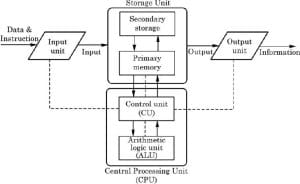
In the Figure, the solid lines are used to indicate the flow of instruction and data and the dotted lines represent the control exercised by the control unit.
INTERACTION OF VARIOUS COMPONENTS OF COMPUTER
Input/Output Unit The user interacts with the computer via the I/O unit. The Input unit accepts data from the user and the Output unit provides the processed data i.e. the information to the user. The Input unit converts the data that it accepts from the user, into a form that is understandable by the computer. Similarly, the Output unit provides the output in a form that is understandable by the user. The input is provided to the computer using input devices like keyboard, trackball and mouse. Some of the commonly used output devices are monitor and printer.
Central Processing Unit CPU controls, coordinates and supervises the operations of the computer. It is responsible for processing of the input data. CPU consists of Arithmetic Logic Unit (ALU) and Control Unit (CU).
ALU performs all the arithmetic and logic operations on the input data. CU controls the overall operations of the computer i.e. it checks the sequence of execution of instructions, and, controls and coordinates the overall functioning of the units of computer.
Additionally, CPU also has a set of registers for temporary storage of data, instructions, addresses and intermediate results of calculation.
Memory Unit Memory unit stores the data, instructions, intermediate results and output, temporarily, during the processing of data. This memory is also called the main memory or primary memory of the computer. The input data that is to be processed is brought into the main memory before processing. The instructions required for processing of data and any intermediate results are also stored in the main memory. The output is stored in memory before being transferred to the output device. CPU can work with the information stored in the main memory. Another kind of storage unit is also referred to as the secondary memory of the computer. The data, the programs and the output are stored permanently in the storage unit of the computer. Magnetic disks, optical disks and magnetic tapes are examples of secondary memory.
History:
EVOLUTION OF COMPUTERS
- In the beginning, when the task was simply counting or adding, people used either their fingers or pebbles along lines in the sand. In order to simplify the process of counting, people in Asia Minor built a counting device called abacus. This device allowed users to do calculations using a system of sliding beads arranged on a rack.
- With the passage of time, many computing devices such as Napier bones and slide rule were invented.
- In 1642, a French mathematician, Blaise Pascal invented the first functional automatic calculator. This brass rectangular box, also called a Pascaline, used eight movable dios to adds sums eight figures long.
- In 1694, german mathematician Gottfried wilhem von Leibniz extended pascal’s design to perform multiplication, division and to find square root. This machine is known as Stepped Reckoner.
- The real beginnings of computers as we know them today, however, lay with an English mathematics professor, Charles Babbage. In 1822, he proposed a machine to perform differential equations, called a Difference Engine.
- In 1889, Herman Hollerith, who worked for us census bureau, also applied the Jacquard loom concept to computing. Hollerith’s method used cards to store data, which he fed into a machine that compiled the results mechanically.
- Mark I, which was built as a partnership between Harvard Aiken and IBM in This electronic calculating machine used relays and electromagnetic components to replace mechanical components
- In 1946, John Eclcert and John Mauchy of developed ENIAC (electronic numerical integrator and calculator) Thus computer used electronic vacuum tubes to make internal parts of the computer
- Eckert and mauchy also proposed the development of EDVAC ( electronic discrete variable automatic computer. It was the first electronic computer to use the stored program concept introduced by John von Neumann.
- In 1949, at the Cambridge university, Maurice wilkes developed EDSAC (electronic delay storage automatic calculator) This machine used mercury delay lines for memory and vacuum tubes for logic.
- The Eckert – mauchy corporation manufactured UNIVAC ( universal automatic computer) in 1951 and its implementation marked the real beginning of the computer
A Brief History of Computers
“History reveals a clear pattern in the evolution of computers. Processing power increases rapidly after the introduction of the new technology. The rate of growth eventually slows down as the technology is exploited to its full potential. While in the background other technologies are nurturing and one ultimately supersedes the other to become the dominant technology and this cycle is repeated.
Under the right conditions the shift to the new technology can lead to possible increase in processor speed of hundred to thousand times. In order to have a better idea of the evolution of computers it is worthwhile to discuss some of the well- known early computers. These are as follows:
- The Mark I Computer (1937-44): Also known as Automatic Sequence Controlled calculator, this was the first fully automatic calculating machine designed by Howard A. Aiken of Harvard University in collaboration with IBM (International Business Machines) Corporation. It was an already developed for punched card machines. Although this machine proved to be extremely reliable, it was very complex in design and huge in size. It used over 3000 electrically actuated switches to control its operations and was approximately 50feet long and 8 feet high. It was capable of performing five basic arithmetic operations: addition, subtraction, multiplication, division, and table reference on numbers as big as 23 decimal digits. It took approximately 0.3 second to add two numbers and 4.5 seconds for multiplication of two numbers. Obviously, the machine was very slow as compared to today’s computers.
- The Atanasoff- Berry Computer (1939-42): John Atanasoff developed an electronic machine to solve certain mathematical equations. The machine was called the Atanasoff Berry Computer or ABC after its inventor’s name and his assistant, Clifford Berry. It used 45 vacuum tubes for internal logic and capacitors for storage.
- The ENIAC (1943-46): The Electronic Numerical Integrator and Calculator (ENIAC) was the first all electronic computer. It was constructed at the Moore School of Engineering of the University of Pennsylvania, U.S.A by a design team led by Professors
- Presper Eckert and John Mauchly: The team developed ENIAC because of military needs. It was used for many years to solve ballistic related problems. It took up wall space in a 20 x 40 square feet room and used 18,000vacuum tubes. It could add two numbers in 200 microseconds and multiply them in 2000 microseconds.
- The EDVAC (1946-52): A major drawback of ENIAC was that its programs were wired on boards that made it difficult to change the programs. Dr. John Von Neumann later introduced the” stored program” concept that helped in overcoming this problem. The basic idea behind this concept is that a sequence of instructions and data can be stored in the memory of a computer for automatically directing the flow of operations. This feature considerably influenced the development of modern digital computers because of the ease with which different programs can be loaded and executed on the same computer. Due to this feature, we often refer to modern digital computers as stored program digital computers. The Electronic Discrete Variable Automatic Computer (EDVAC) used the stored program concepts in its design. Von Neumann also has a share of the credit for introducing the idea of storing both instructions and data in binary form( a system that uses only two digits – 0 and 1 to represent all characters), instead of decimal numbers or human readable words.
- The EDSAC (1947-49): Almost simultaneously with EDVAC of U.S.A.; the Britishers developed the Electronic Delay Storage Automatic Calculator (EDSAC). The machine executed its first program in May 1949. In this machine, addition operations took 1500 microseconds and multiplication operations took 4000 microseconds. A group of scientists headed by Professor Maurice Wilkes at the Cambridge University Mathematical Laboratory developed this machine.
- The UNIVAC I (1951): The Universal Automatic Computer (UNIVAC) was the first digital computer that was not “one of a kind”. Many UNIVAC machines were produced, the first of which was installed in the Census Bureau in 1951 and was used continuously for 10years. The first business use of a computer, a UNIVAC I, was by General Electric Corporation in 1954.
In 1952, the International Business machines (IBM) Corporation introduced the IBM-701 commercial computer. In rapid succession, improved models of the UNIVAC I and other 700- series machines were introduced. In 1953, IBM produced the IBM-650, and sold over 1000 of these computers. UNIVAC marked the arrival of commercially available digital computers for business and scientific applications.
Generation:
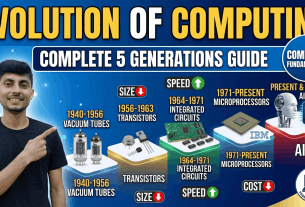
Generation of Computer refers to the historical classification of computers based on the technology used, size, speed, storage, and capabilities during different time periods. Computers have evolved through five main generations, each marking a major technological breakthrough.
1.First Generation (1940-56) : Vacuum Tube
First generation computer were vacuum tubes/thermionic value based machines these computers used vacuum tubes for circuitry and magnetic drums for memory.
A magnetic drum is a metal cylinder coated with magnetic iron-oxide material on which data and programs can be stored.
Input was based on punched cards and paper tape and output was in the form of printouts.
For example: ENIAC, EDVAC AND UNIVAC.
Characteristics of First Generation Computers.
- These computers were based on vacuum tube technology.
- These were the fastest computing devices of their time.
- These computers were very large, and required a lot of space for installation.
- These were non-portable and very slow equipment’s.
2.Second Generations (1956-63): Transistors
A transistor is made up of semiconductor material like germanium and silicon. It usually had three leads and performed electrical functions such as voltage, current or power amplification with low power requirement.
Since transistor is a small device, the physical size of computers was greatly reduced.
Computers became smaller, faster, cheaper, energy-efficient and more reliable than their predecessors.
Magnetic cores- were used as primary memory and magnetic disks as secondary storage devices. However, they still relied on punched cards for input and printouts for output.
For example: PDP – 8 , IBM 1401 and IBM 7090
Characteristics of Second Generation Computer.
- These machines were based on transistor technology
- These were smaller as compared to the first generation computers.
- These were more portable and generated less amount of heat.
3.Third Generation (1964 – Early 1970), Integrated Circuits
The development of the integrated circuit was the trait of the third generation computer. Also called an ic, an integrated circuit consists of a single chip with many components such as transistors and resistors fabricated on it.
Integrated circuit replaced several individually wired transistor. This development made computers smaller in size, reliable and efficient.
Instead of punched cards and printouts, users interacted with third generation computers through keyboards and monitors and interfaced with operating system.
For example : NCR 395 and B6500
Characteristic of Third Generation Computer
- These computers were based on integrated circuit (IC) technology.
- They were able to reduce computational time from micro seconds to nano seconds.
- Extensive use of high – level language became possible
4. Fourth Generation (Early (1970 – Till Date) Microprocessors)
The technology of this generation was still based on the integrated circuit, these have been made readily available to use because of the development of the microprocessor.
The fourth generation computers led to an era of large scale integration (LSI) and very large scale integration (VLSI) technology. LSI technology allowed thousands of transistors to be constructed on one small slice of silicon material whereas VLSI squeezed hundreds of thousands of components on to a single ewp.
ULTRA – large scale integration (ULSI) increased that number into millions the fourth generation computer became more powerful compact, reliable and affordable.
For example: apple ii, attair 8800 and CRAY-1
Characteristics of Fourth Generation Computers
- Fourth generation computers are microprocessor based systems
- These computers are very small
- GUI an d pointing devices enable users to learn to use the computer quickly
- Interconnection of computers leads to better communication and resource sharing
5. Fifth Generation (Present and Beyond): Artificial Intelligence
A computer would learn from its mistakes and possess the skill of experts the starting point for the fifth generation of computers has been set in the early 1990. The expert system it defined as a computer information system that attempts to mimic the thought process and reasoning of experts in specific areas three characteristics can be identified with the fifth generation computer these are.
Mega chips
Fifth generation computers will use super large scale integrated (SLSI) chips, which will result in the production of microprocessor having millions of electronic components on a single chip
Parallel processing
A computer using parallel processing accesses several instructions at once and works on them at the same time through use of multiple central processing units.
Artificial intelligence: (AI)
AI comprises a group of related technologies expert systems (ES), natural language processing (NLP) speech recognition, vision recognition and robotics.
Characteristics
CHARACTERISTICS OF COMPUTER
- Speed
- Accuracy
- Diligence
- Reliability
- Storage capability
- Versatility
- Resource sharing
1. Speed
Computer process data at an extremely fast rate – millions of instructions per second in few seconds, a computer can perform a huge task that a normal human being may take days or even years to complete. The speed of a computer is calculated in Mhz
2. Accuracy
Besides efficiency, computer are accurate as well. The level of accuracy depends an the instructions and the type of machine being used.
3. Diligence
Computer being a machine does not suffer form the human trailts of tiredness and lack of concentration
4. Reliability
Reliability is the measurement of performance of a computer, which is measured against some predetermined standard for operation without any failure.
5. Storage capability
The main memory of the computer is relatively small and it can hold only a certain amount of information, therefore, the data is stored on secondary storage devices such as magnetic tape or disks.
6. Versatility
It can perform multiple taks simultaneously with great ease. For example, at one moment it can be used to draft a letter, another moment it can be used to play music an in between, one can print a document as well. All this work is possible by changing the program.
7. Resource sharing
It made the sharing of costly resources like printer possible. Apart from device sharing data and information can also be shared among group of computers, thus creating a large information and knowledge base.
Types & Applications of Computers
Types of computer
Two types of classification:
- On the basis of Technology
- On the basis of Size
1. On the basis of Technology
- Analog Computers
- Digital Computers
- Hybrid Computers
Analog Computers:
Analog Computer is a computing device that works on continuous range of values. The results given by the analog computers will only be approximate since they deal with quantities that vary continuously. It generally deals with physical variables such as voltage, pressure, temperature, speed, etc
Digital Computers:
A digital computer operates on digital data such as numbers. It uses binary number system in which there are only two digits 0 and 1. Each one is called a bit. The digital computer is designed using digital circuits in which there are two levels for an input or output signal. These two levels are known as logic 0 and logic 1. Digital Computers can give more accurate and faster results. Based on the purpose, Digital computers can be further classified as:
• General Purpose Computers
• Special Purpose Computers
Hybrid Computers:
A hybrid computer combines the desirable features of analog and digital computers. It is mostly used for automatic operations of complicated physical processes and machines. Now-a-days analog-to-digital and digital-toanalog converters are used for transforming the data into suitable form for either type of computation. For example, in hospital’s ICU, analog devices might measure the patients temperature, blood pressure and other vital signs.
2. Types of computers on the basis of size
• Super Computers
• Mainframe Computers
• Mini Computers
• Micro Computers
Super Computers:
When we talk about types of computers, the first type that comes to our mind would be Super computers. They are the best in terms of processing capacity and also the most expensive ones. These computers can process billions of instructions per second. Normally, they will be used for applications which require intensive numerical computations such as stock analysis, weather forecasting
Mainframe Computers
Mainframe computers can also process data at very high speeds i.e., hundreds of million instructions per second and they are also quite expensive. Normally, they are used in banking, airlines and railways etc. for their applications.
Mini Computers
Mini computers are lower to mainframe computers in terms of speed and storage capacity. They are also less expensive than mainframe computers. Some of the features of mainframes will not be available in mini computers. Hence, their performance also will be less than that of mainframe computers.
Micro Computers
A micro computer is a small, low cost digital computer, which usually consists of a microprocessor, a storage unit, an input channel and an output channel, all of which may be on one chip inserted into are or several pc boards.
IBM – pc,Pentium 100, ibm-pc Pentium 200 and Apple Macintosh are some of the example of micro computers
Applications of Computers
Computers are widely used in number of fields as given below:
Business
A computer has high speed of calculation, diligence, accuracy, reliability, or versatility which has made it an integrated part in all business organizations.
Computer is used in business organizations for Payroll calculations, Budgeting, Managing employee database and Maintenance of stocks, etc.
Banking
Today, banking is almost totally dependent on computers. Banks provide the following facilities:
- Online accounting facility, which includes checking current balance, making deposits, checking interest charges and shares etc.
- ATM machines which are completely automated are making it even easier for customers to deal with banks.
Insurance
Insurance companies are keeping all records up-to-date with the help of computers. Insurance companies, finance houses, and stock broking firms are widely using computers for their concerns. Insurance companies are maintaining a database of all clients with information showing:
- Starting date of the policies, Next due installment of a policy
- Maturity date, Interests due, Bonus
Education
The computer helps in providing a lot of facilities in the education system.
- The computer provides a tool in the education system known as CBE (Computer Based Education), CBE involves control, delivery, and evaluation of learning.
- Computer education is rapidly increasing the graph of number of computer
- It is used to prepare a database about performance of a student and analysis is carried out on this basis.
Marketing
In marketing, uses of the computer are following −
- Advertising − With computers, advertising professionals create art and graphics, write and revise copy, and print and disseminate ads with the goal of selling more products.
- Home Shopping − Home shopping has been made possible through the use of computerized catalogues that provide access to product information and permit direct entry of orders to be filled by the customers.
Healthcare
Computers have become an important part in hospitals, labs, and dispensaries. They are being used in hospitals to keep the record of patients and medicines. It is also used in scanning and diagnosing different diseases. ECG, EEG, ultrasounds and CT scans, etc. are also done by computerized machines.
Military
Computers are largely used in defense. Modern tanks, missiles, weapons, etc. Military also employs computerized control systems. Some military areas where a computer has been used are
- Military Operation and Planning, Missile Control
- Smart Weapons, Military Communication
Communication
Communication is a way to convey a message, an idea, a picture, or speech that is received and understood clearly and correctly by the person for whom it is meant. Some main areas in this category are −
- E-mail, Chatting
- FTP, Telnet
- Video-conferencing
Government
Computers play an important role in government services. Some major fields in this category are:
- Budgets, Sales tax department, Income tax department
- Computation of male/female ratio, Computerization of voters lists
- Computerization of PAN card, Weather forecasting
What do you feel about this post?

Like

Love

Happy

Haha

Sad